WINBOT W3 OMNI: what it does for you, and what it leaves to you
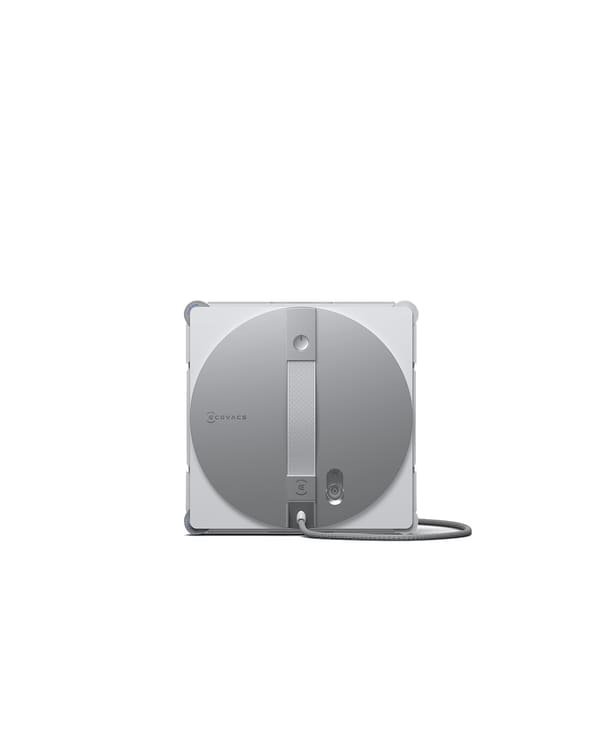
The Ecovacs WINBOT W3 OMNI is a window-cleaning robot whose station washes its removable pad. That takes one chore off you, but you still set it up, anchor it, watch it, move the pad into the station and empty the tanks. Here is what Ecovacs’ own US pages and manual say it needs, what’s left to you, and what they don’t settle.
$699.99 on Ecovacs’ US store, in stock, Nov 14, 2026 (US dollars, before tax).
The short version
- Price
- $699.99 on Ecovacs’ US store, in stock, Nov 14, 2026. It was $549, a sale price, when we first recorded it on Oct 30, 2026.
- What the station automates
- Washing the W3 OMNI’s pad, in “just 1 minute”, Ecovacs says. You still take the pad off the robot, put it in the station and clip it back on, the manual’s steps show.
- How it’s held up
- Suction on the glass, and one cable that is both power cord and safety rope, clipped to something solid indoors. Ecovacs says the 10 kg station also holds itself to the floor by suction, on smooth floors without gaps only.
- If its battery runs low
- Ecovacs says the W3 OMNI “will remain attached to the window for over 30 minutes”. That’s Ecovacs’ holding claim, not cleaning time, and not a promise it can’t fall.
- Outside windows
- The W3 OMNI manual allows them only when it’s tethered, the wind is calm, and it isn’t raining or snowing, with nobody below.
- Windows it won’t do
- The W3 OMNI manual rules out glass under 3 mm thick, stickers or raised patterns, gaps, greasy glass and more. On frames, Ecovacs’ manual and its WINBOT FAQ give different limits.
- Battery
- “Up to 130 minutes”, Ecovacs says for the W3 OMNI. Its manual says two different things about charging while it cleans.
- Not found in Ecovacs’ pages we checked
- The smallest window, how far the glass may tilt, and terms for the “Accidental Damage Insurance” the product page mentions.
On this page
United States only. Prices in US dollars on Ecovacs’ US store, before tax. Manual quotes are from Ecovacs’ Americas edition of the W3 OMNI manual (English section), linked from its US product page, unless a line says otherwise. Not a review: we haven’t used one.
Does the W3 OMNI suit my home?
Check your home against what Ecovacs’ W3 OMNI manual asks for.
This is a fit check from Ecovacs’ stated requirements, not a verdict: we haven’t used one.
It can suit you if
- Your glass is at least 3 mm thick, flat and free of stickers, patterns, cracks and gaps, and no bigger than about 8 m wide by 2.5 m high
- The floor by the window is smooth with no gaps (polished floor, tile, marble), so the station’s suction cup can hold
- There’s something solid and immovable nearby to lock the safety rope to
- You’re happy to stay with it while it works, keep people and pets out from under it, and tidy up after: pad, tanks, wash compartment
Ask Ecovacs first if
- Your frames are between 2 mm and 5 mm deep: Ecovacs’ pages disagree on the limit
- Your windows are small or sloped: we found no size or tilt range for the W3 OMNI
- The window is above carpet, or the floor has gaps: the manual says not to place the station there
From the W3 OMNI manual (Americas), pages 3–4 and 16–25, and the sections below. Checked Nov 14, 2026.
Will it work with my windows and floor?
Most limits are settled in the W3 OMNI manual. Three aren’t: frames, the smallest window and sloped glass.
| What to check | What Ecovacs says for the W3 OMNI | Settled? |
|---|---|---|
| Glass thickness | “Do not use on glass less than 3 mm (0.12 in) thick or mirrors less than 4 mm (0.16 in) thick.” Manual p.4 | Yes |
| Largest window | About 8 m wide × 2.5 m high; beyond that, “Limited by the length of Compound Cable”. More than 8 m long: “Only available in zone clean mode.” The WINBOT FAQ gives the same size. Manual p.17 | Yes |
| Smallest window | “Small Glass” is pictured as not recommended, with no size. Manual p.16 | Not found in the pages we checked |
| Sloped glass | No tilt range on the W3 OMNI page or in its manual. | Not found in the pages we checked |
| Frames | Manual: “Do not use the Appliance on a framed glass with a frame smaller than 5 mm (0.2 in).” WINBOT FAQ: glass free of “frames under 2 mm”. Manual p.4 · WINBOT FAQ | No: Ecovacs’ own pages disagree |
| Glass surface | Not on “static cling stickers, advertising posters, or raised patterns”, glass “with gaps or holes”, or “two pieces of adjacent, frameless glass with a gap between them”. Not on “greasy windows”. Manual p.3–4 | Yes |
| Handles | “Do not use on glass or mirrors with a handle height of 70~105 mm (2.76~ 4.13 in).” Manual p.4 | Yes |
| Frameless edges | Start it “more than 10cm away from the edge”. Manual p.20 | Yes |
| Tight spots | It “may get stuck” where handles, curtain boxes or cabinets sit close to the glass. For glass doors, “open the door before attaching WINBOT”. Manual p.17–18 | Yes |
| Floor for the station | “Always place the station on flat, seamless ground.” Not on “tables or countertops”, “carpets or tiled/wooden floors with gaps”. Manual p.19 | Yes |
| Tinted glass | Works “as long as the surface is smooth”, the WINBOT FAQ says, for all WINBOTs. WINBOT FAQ | Yes, for WINBOTs in general |
Look closerThe frame limit
The W3 OMNI manual says no frames under 5 mm. Ecovacs’ WINBOT FAQ, which covers all its window robots, says frames under 2 mm are the problem. Those can’t both be the limit for a frame between 2 mm and 5 mm. We haven’t picked one: ask Ecovacs which applies to the W3 OMNI before you buy. The manual also says it “cannot detect obstacles or frames with a height lower than 1 mm.”
W3 OMNI manual (Americas), pages 3–4, 16–20 and 28, linked from Ecovacs’ US product page; WINBOT FAQ on Ecovacs’ US WINBOT page. Checked Nov 14, 2026.
What does the station do, and what’s left to you?
The station washes the pad. Moving the pad, and the tidying after, is yours.
What Ecovacs says the station does: washes the pad in “just 1 minute”, with “sixteen high-pressure nozzles” and “four scrubbing discs” that “spin at 200 RPM”; then cleans itself, which Ecovacs says you can choose to switch on. Two washes: “Standard Wash” for lightly soiled pads, “Heavy-Duty Wash” for heavily soiled ones. It also holds 1.2 L of clean water, collects dirty water, powers the robot and winds the cable back in.
Look closerThe pad still goes in by hand
The W3 OMNI page says “No more hand-washing or touching dirty wiping pad!” The manual’s steps have you take the pad off the robot (“Firmly pinch the clips on both sides of the wiping pad with both hands, and lift upwards”), put it in the station (“fleece side facing inward”), and clip it back on. So the station does the washing, and you move the pad. Manual p.14–15, 25
After each clean, the W3 OMNI manual has you
- Pour out what’s left in the robot’s 80 ml tank.
- Pour out and rinse both station tanks.
- Wipe or air-dry the station’s wash compartment after it self-cleans, “to prevent odors”.
- Take off the wet pad and let it “dry completely before storage”.
- Hang the robot on the station, retract the cable and unlock the safety rope.
Now and then: replace a pad after it has been “used a total of 30 times”, or sooner if you get “low air pressure alerts”. Wipe the wheel tracks, fan, sensors and side rollers with a dry cloth.
What goes in the tank: Ecovacs’ WINBOT cleaning solution only: “do not use any cleaning solutions other than the ECOVACS WINBOT cleaning solution”. Tap water “can be used temporarily”. “Do not use purified water or filtered water.” The manual says one 80 ml tank “covers approximately 55 m² of windows”; the spec table says “50±5” m² in Fast mode.
Ecovacs US store, W3 OMNI page and spec table; W3 OMNI manual (Americas), pages 14–15 and 21–27. Checked Nov 14, 2026.
What setup and safety requirements should I check?
A short list of what the W3 OMNI manual asks. It doesn’t replace the manual.
Read Ecovacs’ own safety instructions (pages 3–6) and setup pages (18–21) before you use it.
- Where the station goesManual p.19, 21
On the floor next to the window, on flat, seamless ground; for full-length windows, “near the window opening”. Keep 10 cm clear around it, or “the suction cup’s holding power may be reduced.”
- The safety ropeManual p.18
Fitted at the factory with its carabiner: “Do not disassemble it at will.” The manual gives two descriptions of what to lock it to; see below.
- Starting itManual p.20
Clean a patch of glass bigger than the robot first. On frameless glass, start “more than 10cm away from the edge”.
- While it worksManual p.3, 20
“Do not leave the Appliance unattended when using it. To prevent bodily injury or property damage caused by accidental falling of the Appliance, please make sure there are no people, animals, or valuable, fragile objects under the working area of WINBOT.” “Do not stand below or near the WINBOT while it is cleaning.”
- Taking it offManual p.21
“When removing WINBOT, always grip the handle securely to prevent it from falling.”
- ChildrenManual p.3, 6
“Children shall not play with the appliance.” “Keep the appliance out of reach of children when it is energized.”
- TemperatureManual p.3
Not “below 0°C/32°F or above 40°C/104°F, above 85% humidity”.
Look closerWhat to lock the rope to
The manual’s safety list (instruction 4): “please use the Carabiner to lock the safety tether to a strong indoor railing”. Its setup page (p.18): “a stable, immovable object such as a table leg, chair leg, bed leg, sofa leg, curtain rod, or staircase handrail”. Both are Ecovacs’ words, in the same manual. We’re not choosing between them or suggesting anchors of our own: ask Ecovacs which applies to your window, especially an outside one.
Can I use it on outside windows?
Under conditions. The manual: “The Appliance can be used to clean exterior windows if it is properly tethered to a safe position with the Carabiner, winds are calm, and it is not raining or snowing.” Also: “In rainy weather, do not use the Appliance on the exterior window”, and “Do not use the Appliance in whole gale storms and force-10 winds”. The plug and power adapter “must be used indoor”.
How does it stay on the glass?
In Ecovacs’ words, with what each applies to. These are Ecovacs’ claims; we haven’t measured any of them.
| Part | What Ecovacs says about the W3 OMNI | Where |
|---|---|---|
| The robot’s suction | “optimized 10000Pa suction power” (one of “8 hardware-based fall protection features”). The spec table gives “Suction Power while moving” as “3300±100Pa”. | Product page |
| The cable | “The composite safety rope and power cord combines both cables into one”. “The primary safety rope is a three-layer composite cable with a tensile strength of up to 100 kg.” The manual gives the cable as 5.5 m long. | Product page, manual p.19 |
| The station | “The station, weighing 10 kg itself, generates over 800N of suction force to prevent the WINBOT W3 OMNI from falling”. “An additional 1-meter safety rope is attached to the base of the station.” | Product page |
| Low battery | “Even if the power level is low, the WINBOT W3 OMNI will remain attached to the window for over 30 minutes.” | Product page |
The two suction figures are for different conditions (one is “while moving”), so they aren’t two answers to the same question. We show both and don’t pick one.
W3 OMNI manual (Americas), safety instructions (pages 3–6) and pages 18–21; Ecovacs US store, W3 OMNI page and spec table. Checked Nov 14, 2026.
Battery, power and charging
It runs plugged in or on battery: “up to 130 minutes”, Ecovacs says.
Ecovacs: “The built-in battery delivers up to 130 minutes of continuous cleaning on a single charge”. That’s Ecovacs’ figure, not one we’ve timed. The battery is in the station: off the wall, “the station uses its builtin battery to power WINBOT”. The box also has a separate battery pack you connect to the station: “Connecting the battery pack will further extend the battery life.” Ecovacs doesn’t say whether the 130 minutes counts that pack.
Ecovacs’ general WINBOT FAQ says “up to 110 minutes”. That answer covers WINBOTs in general; the W3 OMNI’s own page says 130.
Charging: “approximately 3 hours” at room temperature, the manual says. “WINBOT’s fan cannot operate while charging.” Charge between 4°C and 40°C, and recharge every six months if it’s stored. “The robot contains batteries that are only replaceable by skilled persons.”
Look closerCan it charge while it cleans? The manual says two things
Page 13: “When connected to a power outlet, WINBOT can operate normally while the station’s built-in battery charges slowly.” Page 23, note 5: “The station cannot charge while WINBOT is in operation.” Note 7, on the same page: “If WINBOT is running while the station is charging, the charging speed will be significantly slower”, with charging then over 6 hours. We can’t tell you which is right; ask Ecovacs. Manual p.13 · p.23
Do I need the app?
Not to start it. The station’s buttons start and pause it and switch between three modes: Fast, Deep and Edge. The ECOVACS HOME app adds Thorough, Spot, Heavy-duty, Zone and Remote Control, plus steering and troubleshooting.
- Without Wi-Fi: Ecovacs’ WINBOT FAQ says WINBOTs work without it, “However, without Wi-Fi, you lose app-based features like access to more cleaning modes and troubleshooting guidance.” The W3 OMNI pairs with the app by Bluetooth; Wi-Fi only adds alerts on your phone, the manual says.
- What the app asks for: “access permissions for Location, Bluetooth, and Phone Storage”. Wi-Fi must be 2.4 GHz. One robot binds to one account.
- Paid plan: we found none on Ecovacs’ ECOVACS HOME app page, Nov 14, 2026. That’s our finding, not a promise from Ecovacs.
- When it gets stuck, the manual’s fix is often the app: hold the rope or cable “with your hand” and steer it away.
Ecovacs US store, W3 OMNI page; W3 OMNI manual (Americas), pages 8–9, 12–13, 20, 23–24 and 28–30; WINBOT FAQ. Checked Nov 14, 2026.
Beside the other WINBOTs
Of the four Ecovacs WINBOTs that can run on battery, the W3 OMNI is the only one whose station washes the pad.
| Model | Price (USD, Ecovacs’ US store) | Battery, Ecovacs says | How the pad is washed, per its manual | Largest window |
|---|---|---|---|---|
| WINBOT W2 PRO OMNI | $379, a sale price, Nov 12, 2026 | Up to 110 min | By hand: “Wash it with tap water” | Ecovacs’ pages give different sizes |
| WINBOT W2S OMNI | $599.99, Nov 12, 2026 | Up to 110 min | By hand: “Wash it with tap water” | 8 m × 2.5 m |
| WINBOT W2S PRO OMNI | $599.99, Nov 12, 2026 | Up to 110 min | By hand: “Wash it with tap water” | 8 m × 2.5 m (Zone Clean) |
| WINBOT W3 OMNI | $699.99, Nov 12, 2026 | Up to 130 min | In the station; you move the pad in and out | 8 m × 2.5 m |
Not ranked; in price order. Prices from our last check of each model on Ecovacs’ US store; we rechecked the W3 OMNI on Nov 14, 2026. Pad washing from each model’s manual, linked from its US product page.
That’s from Ecovacs’ own pages. On the W3 OMNI the pad still goes in and out by hand. The W2S OMNI’s manual is the multi-language edition linked from its US page, not an Americas one. See all window robots, compare the W3 OMNI with another window robot, or read how to choose a window robot.
What it costs to own, the warranty and returns
$699.99 on Ecovacs’ US store on Nov 14, 2026, plus pads and solution over time.
- Oct 30, 2026
$549, a sale price. First recorded.
- Nov 12, 2026
$699.99. The sale is over.
- Nov 14, 2026
Last checked. $699.99, in stock.
The same page sells two bundles (“W3 OMNI & Cleaning Solution” $730.00 and “W3 OMNI Package” $775.00, Nov 14, 2026). They aren’t the robot’s price.
Things you’ll buy again, listed on the same page, Nov 14, 2026: W3 OMNI Wiping Pad $39.99; WINBOT Cleaning Solution 1L $24.99 (two bottles $44.99); Cleaning Kit for WINBOT W3 OMNI $124.97. The page doesn’t say how many pads come in a pack.
Who sells it
We’ve checked Ecovacs’ own US store. Ecovacs’ Where to Buy page links 15 US retailers, including Amazon, Best Buy, Costco, Home Depot, Lowe’s, Target and Walmart, but each link goes to an Ecovacs brand search, not to the W3 OMNI. We haven’t checked which of them sells this model.
Warranty and returns
Warranty: Ecovacs’ US store terms give 12 months against “defects in material and workmanship” from the date of purchase. Ecovacs doesn’t warrant products “not purchased from Us or Our Dealers”. The terms exclude damage from “improper installation, maintenance, use or abuse”, unauthorized repairs, parts Ecovacs didn’t supply, and use “in excess of the Product’s rating, specifications or intended use”.
Extended warranty: the store offers 1 year ($59.00) or 2 years ($89.00) of “Ecovacs Care”, run by a separate company, Servify. It starts when the 12 months end, and only once you activate it from Servify’s email. Ecovacs says it covers “mechanical breakdown after the manufacturer warranty expires, battery failure, or power surge”.
Returns: 30 days on Ecovacs’ own store, with the receipt, box and accessories. If you return it for personal reasons, you pay return shipping, and the original shipping cost comes off the refund.
Look closer“Accidental Damage Insurance”
The W3 OMNI page says owners “can also enjoy insurance protection in the unlikely event of damage caused by a loss of suction.” We didn’t find its terms (no insurer, limit or way to claim) on the product page, the W3 OMNI support page, or Ecovacs’ US warranty and extended-warranty pages, Nov 14, 2026. Ask Ecovacs for the policy wording before relying on it.
Ecovacs US store, W3 OMNI page; Returns & Warranties; Extended Warranty Service Policy; Where to Buy. Our Changes log. Checked Nov 14, 2026.
Questions our checked sources don’t resolve
Ask Ecovacs about these before you buy.
We checked Ecovacs’ US product page and spec table for the W3 OMNI, its Americas manual, the W3 OMNI support page, Ecovacs’ WINBOT FAQ, its US warranty, returns and extended-warranty pages, and the ECOVACS HOME app page, on Nov 14, 2026. They don’t settle these:
- Frames: which limit applies to the W3 OMNI, 5 mm (manual) or 2 mm (WINBOT FAQ).
- Charging while cleaning: the manual says both that it can and that it can’t.
- Smallest window and tilt: neither found for the W3 OMNI.
- Battery: whether “up to 130 minutes” counts the extra battery pack.
- The rope: a “strong indoor railing”, or the furniture the setup page lists.
- Insurance: the terms of the “Accidental Damage Insurance”.
- Pads: how many come in the box, and in a pad pack.
What would change this page
We recheck Ecovacs’ pages and log every price change, with its date, on the Changes page. We’re watching for:
- A new edition of the W3 OMNI manual, or one that settles charging or frames
- Terms for the “Accidental Damage Insurance”
- A change to the W3 OMNI’s price on Ecovacs’ US store
- A named retailer listing the W3 OMNI
Changes to this page
Every change to the facts on this page, with its date.
- Nov 14, 2026AddedFirst published
Sources
Every fact on this page links to where it came from. We read every page below on Nov 14, 2026; the dates are each page’s own date, or the day we read it.
Ecovacs’ US store
- WINBOT W3 OMNI product page and spec tableNov 14, 2026
- WINBOT page and FAQNov 14, 2026
- Where to BuyNov 14, 2026
Ecovacs’ US support
- W3 OMNI Instruction Manual (Americas)Nov 14, 2026
- W3 OMNI support pageNov 14, 2026
- Returns & WarrantiesNov 14, 2026
- Extended Warranty Service PolicyNov 14, 2026
- ECOVACS HOME appNov 14, 2026
Records
- FCC equipment authorization, 2A64B-WG858Granted Jan 5, 2026
- CPSC recallsNov 14, 2026
- Our Changes logOct 30 to Nov 12, 2026
How this page was made: every fact was checked on Ecovacs’ own US pages and its US manual, and each is dated. Drafted with Claude.
Spot something wrong?
Tell us which fact is wrong and where it says otherwise. Corrections are listed on the Corrections page, with what we had before.
Keep going
Every window robot we track, with dated prices, or up to three side by side.